
Hey folks, I post some articles about technology and tricks & tips how to do some stuff in dev environment. 🚀
My CV page is here.
Deploying T3 Code on an ARM SBC: Orange Pi Zero 3, systemd, Pangolin, and OpenCode
Table of Contents
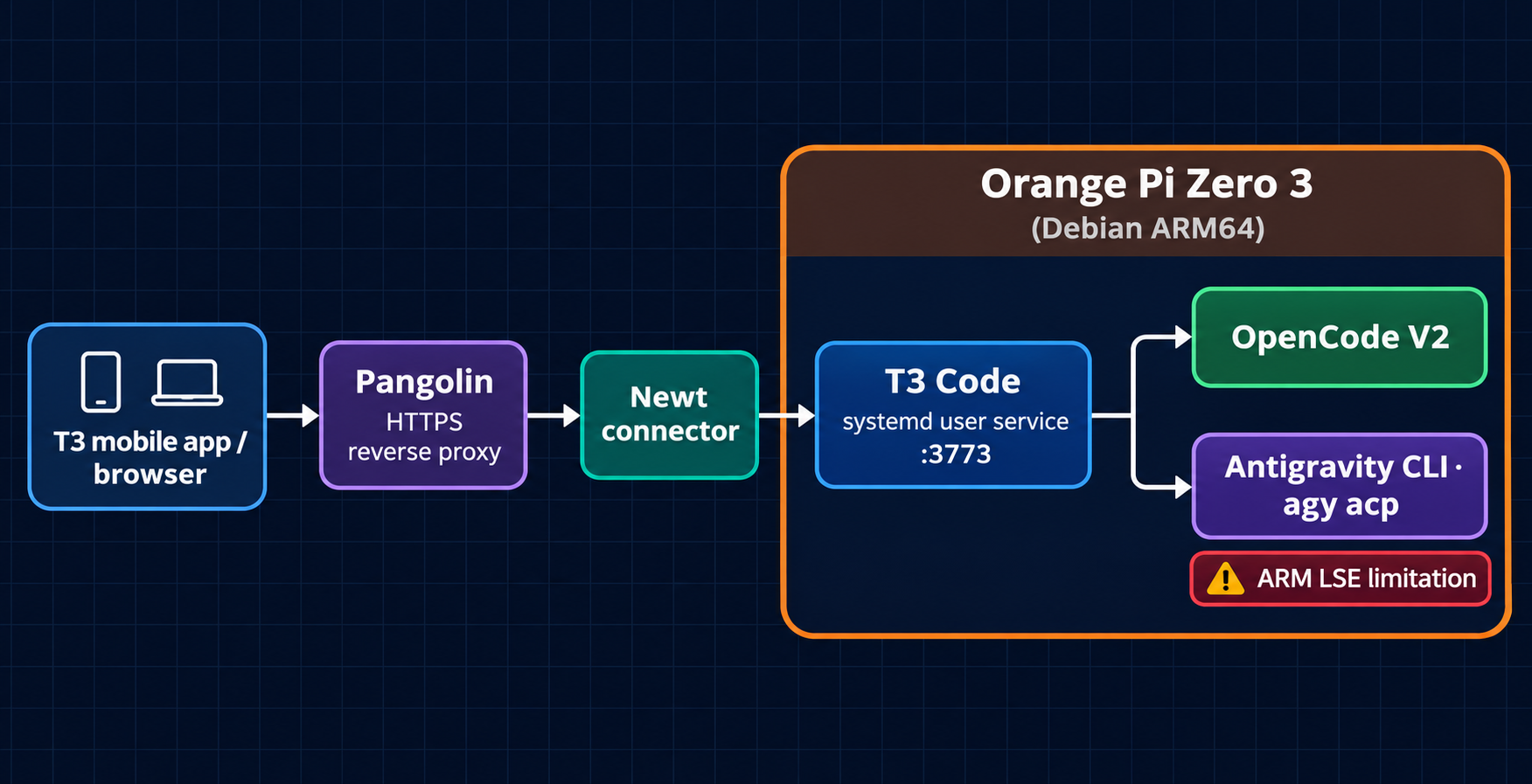
The request path from the mobile client to T3 and its local coding-agent providers.
T3 Code is a useful way to keep a coding-agent environment running on a server while controlling it from a browser or mobile device. I wanted to run it on hardware that was inexpensive, quiet, and always available, so I deployed it on an Orange Pi Zero 3 instead of using a desktop machine or a container host.
The final setup is:
- Orange Pi Zero 3 running Debian 12 ARM64
- T3 Code 0.1.7 running as a native
systemd --userservice - Pangolin providing the public HTTPS endpoint
- OpenCode V2 installed as a user-local npm package
- T3 Code mobile access through
https://t3.thisroman.dev
This article documents the parts that worked, the integration details that mattered, and the ARM compatibility problem I found with Antigravity.
Why run T3 on an SBC? #
An SBC is a good fit for a personal coding environment because it uses very little power and can stay online continuously. The trade-off is that the hardware is less forgiving than a modern laptop: storage is usually a microSD card, memory is limited, and ARM binaries sometimes assume CPU extensions that are not available on older ARMv8 processors.
The Orange Pi Zero 3 uses a Cortex-A53 CPU. It is a 64-bit ARM board, but its CPU feature set is closer to the ARMv8.0 baseline than to newer ARM64 servers. That distinction becomes important later.
Installing T3 Code natively #
I chose a native installation rather than Docker. T3 needs to launch coding agents and access project files, so a user service gives it a straightforward relationship with the host filesystem and the user’s credentials.
The service runs as the orangepi user. Its environment is kept in the user home directory, including the T3 runtime and userdata:
/home/orangepi/.t3/
The service is exposed locally on port 3773. The important systemd properties are equivalent to:
[Service]
Environment=T3CODE_HOST=0.0.0.0
Environment=T3CODE_PORT=3773
Environment=T3CODE_LAN=true
Binding to 0.0.0.0 is required here because the Pangolin Newt connector reaches the service through the Docker network gateway rather than through loopback.
After installation, I verified the service with:
systemctl --user status t3code.service
ss -ltn | grep 3773
For a user service to survive logout and start at boot, enable lingering once as an administrator:
sudo loginctl enable-linger orangepi
Without lingering, the service may work while the user session is active but not start automatically after a reboot.
Making Node.js available to T3 #
The host needed a current Node.js runtime for agent tooling. I installed the official ARM64 Node.js LTS archive into the user account rather than changing the system package manager:
/home/orangepi/.local/node/
The current runtime used by this deployment is Node.js 26.13.0 with npm 11.20.0. The user-local binaries are exposed through:
/home/orangepi/.local/bin/node
/home/orangepi/.local/bin/npm
/home/orangepi/.local/bin/npx
It is not enough for these commands to work only in an interactive shell. T3 is started by systemd, so its service PATH must also include /home/orangepi/.local/bin. I added a systemd drop-in for the T3 service and restarted it.
Check both the interactive and service environments after changing the path:
node --version
npm --version
systemctl --user show t3code.service -p Environment --value
Exposing T3 through Pangolin #
The Pangolin resource targets the Newt-connected host at the Docker network gateway:
Host: 172.21.0.1
Port: 3773
Public URL: https://t3.thisroman.dev
The main T3 web interface can remain protected by Pangolin authentication, but the mobile client needs to reach T3’s pairing and transport endpoints directly. I added bypass rules for the T3 paths required by the app:
/pair*
/oauth/*
/api/*
/ws*
/.well-known/t3/environment
The discovery endpoint is a useful first check:
curl -i https://t3.thisroman.dev/.well-known/t3/environment
Once it returned HTTP 200, pairing from the mobile app worked through the public hostname.
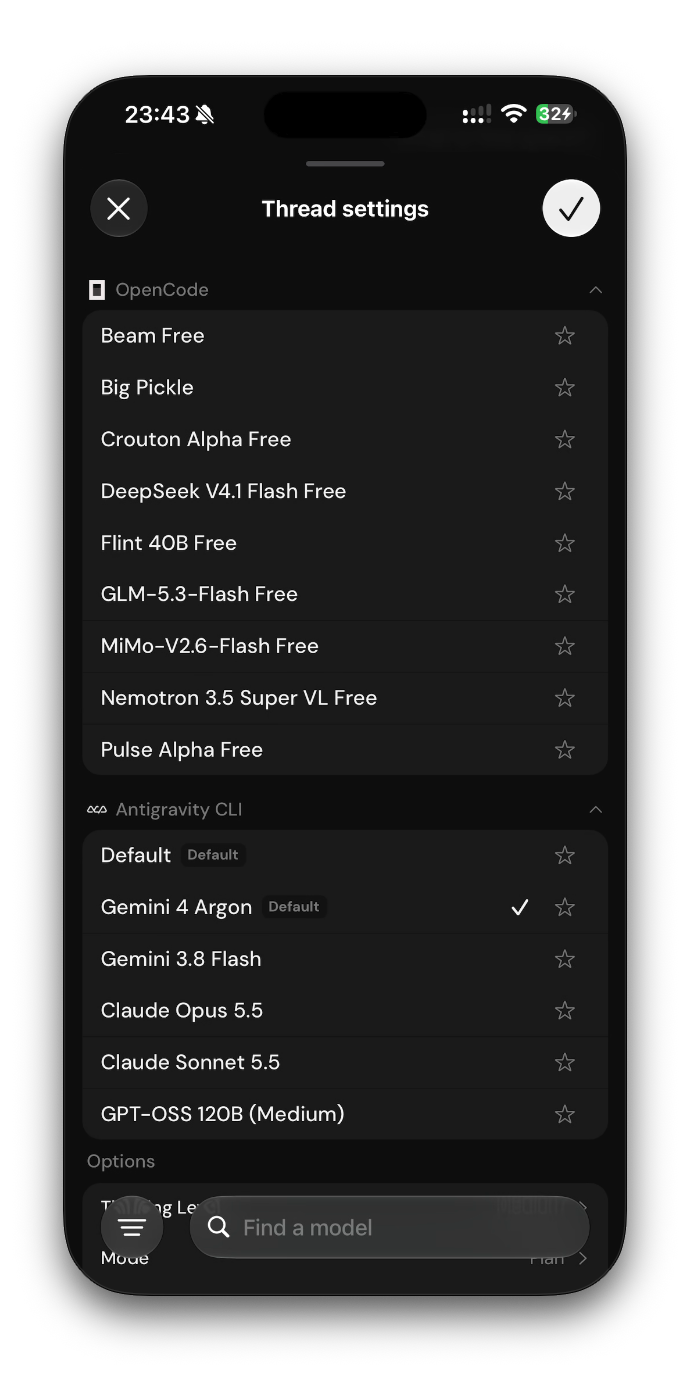
The mobile client can select free OpenCode models or models exposed by the local Antigravity ACP command.
Installing OpenCode V2 #
The original OpenCode V1 executable was removed, but the OpenCode data directories were preserved. T3’s provider configuration then used the V2 CLI installed with npm:
npm install -g @opencode/cli
The resulting executable is:
/home/orangepi/.local/node/bin/opencode
Verify the version and use that exact path in T3’s OpenCode provider settings:
export PATH="$HOME/.local/node/bin:$PATH"
opencode --version
command -v opencode
The T3 provider’s Binary path should be /home/orangepi/.local/node/bin/opencode; the server URL remains empty when T3 launches the local CLI itself.
OpenCode being authenticated does not automatically mean that models are available. Provider authentication and model discovery are separate steps, so connect a model provider in OpenCode and then refresh the provider status in T3.
Antigravity on ARM: the compatibility trap #
The standalone Antigravity CLI installed successfully on the board:
/home/orangepi/.local/bin/agy
agy 1.5.2
However, T3’s built-in Antigravity provider downloads a separate ACP runtime. The standalone CLI and T3’s managed agy_acp_server.par are not the same installation.
The managed runtime downloaded successfully but failed during T3’s validation. The server trace contained the real error behind T3’s generic message:
ACP process exited after signal SIGILL
FATAL ERROR: This binary was compiled with lse enabled,
but this feature is not available on this processor
The Orange Pi reports a Cortex-A53 CPU without the LSE feature in /proc/cpuinfo. This is an upstream binary compatibility issue, not a Node.js, permissions, or disk-space problem. Reinstalling the runtime repeatedly only downloads the same incompatible binary.
The practical workaround is to use the standalone CLI as a generic local ACP command. T3 supports this under Settings → Providers → Add provider → Show more → Local ACP command:
Executable: /home/orangepi/.local/bin/agy
Argument:   acp
The agy acp --login flow can be completed directly on the host. In my case, Safari produced a Google OAuth redirect_uri_mismatch, while another browser completed the same unchanged URL successfully. The authorization code or return URL should be pasted into the waiting host terminal, never published in an article or pasted into chat.
The generic ACP route is preferable to putting /home/orangepi/.local/bin/agy into the built-in Antigravity provider’s Binary path, because that provider expects the managed ACP executable and its matching localharness_external helper.
Troubleshooting checklist #
When a provider does not work, check the layers in this order:
- Host process: confirm the systemd service is active and listening on port 3773.
- Service environment: confirm Node.js and agent binaries are on the service
PATH. - Pangolin routing: verify the discovery endpoint and WebSocket/API bypass rules.
- Provider executable: use an absolute path in T3 rather than relying on an interactive shell alias.
- Provider logs: inspect
~/.t3/userdata/logs/server.trace.ndjsonfor the underlying process error. - CPU compatibility: on ARM boards, check
/proc/cpuinfobefore assuming an ARM64 binary will run.
For example, the Antigravity failure was only diagnosable after looking past the UI message and extracting the nested SIGILL cause from the trace.
Result #
The Orange Pi now provides a low-power, always-on T3 Code environment reachable from the mobile app over HTTPS. Native systemd avoids an extra application container, Pangolin handles the public edge, and user-local Node.js keeps the agent tooling isolated from the base operating system.
OpenCode V2 works with the explicit binary path. Antigravity’s built-in managed runtime does not work on this particular Cortex-A53 board because its current ACP binary requires LSE, but the standalone agy acp command provides a promising generic ACP alternative while T3 and Google work toward broader ARM compatibility.
Small board, always-on agents, and a coding environment in my pocket. See you in the next homelab experiment. 🫡
Comments
Loading comments lets Disqus process your data and may set cookies. Learn more.